Retrofit basement ventilation – it's this easy
Everything you need: sensor, smart plug, and fan. From €65 complete, no electrician needed.
3 ways to ventilate your basement
From the simplest setup to a permanent solution – choose what fits your basement.
Window Solution
Mount a wall fan (Ø 100–150 mm) in an open basement window and seal with foam or a wooden frame. Switch via smart plug or Shelly relay.
Window Panel
Cut a plexiglass or wood panel as a window adapter and insert the inline fan. Window stays closed.
Wall Penetration
100mm core drill through the basement wall, permanently install an inline fan. The cleanest permanent solution.
Installation Guide
Step-by-step for each method – from a quick window setup to a permanent wall solution.
Window Solution
- 1Open the basement window and measure the clear opening
- 2Place the inline fan (Ø 100 or 150 mm) centrally in the window opening
- 3Seal gaps with foam strips or rigid foam board
- 4Run the power cable to the smart plug – plug in and done
For a more secure hold: fix the fan in place with a piece of wooden strip.
Window Panel Method
- 1Measure the window opening exactly (width × height)
- 2Have a plexiglass or plywood panel cut to size (hardware store)
- 3Drill a hole for the inline fan (hole saw Ø 100 or 150 mm)
- 4Insert the inline fan into the panel and seal with silicone
- 5Fit the panel into the window and secure with foam tape
- 6Connect the smart plug – window stays closed
Plexiglass lets light through – the better choice for dark basements.
Wall Penetration (Core Drilling)
- 1Expose the exterior: use the light well or excavate soil to 1 m depth
- 2Mark the drill point inside and outside – check with a pipe/cable detector!
- 3Core drill Ø 100 mm with diamond drill bit (stand-mounted drill + water cooling recommended)
- 4Insert a wall sleeve (waste pipe) and seal the gap with expanding foam
- 5Insert the inline fan, mount a weather protection grille or louvre hood on the outside
- 6Ensure a slight outward slope (2–3°) to prevent water ingress
- 7Connect the smart plug – the cleanest permanent solution
For concrete walls: mount the drill on a stand and use cooling fluid to avoid kickback.
Safety Notice
For wall penetrations: Use a stud/pipe finder to check for electrical, water, and gas lines. Utility lines can run as shallow as 80 cm.
Pro Tip
Core drilling machines can be rented at hardware stores for about €50/day. Alternatively, a tradesperson can do the drilling for €100–200.
Placement
For square basements, one fan is sufficient. For elongated floor plans, two opposing units are recommended for optimal cross-ventilation.
Shopping List
All products are available on Amazon. Pick your setup.
Setup with Shelly
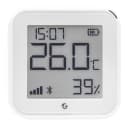
Shelly H&T Gen3 (Indoor Sensor)
Measures temperature and humidity. Connects directly with the Breeqo app.
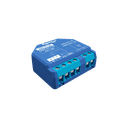
Shelly Plug S (Smart Plug)
Automatically switches the fan on and off. WiFi-controlled.
Outdoor Sensor: Open-Meteo (free)
Weather data is automatically fetched by location. No extra sensor needed.
Setup with SwitchBot
SwitchBot Meter Plus (Indoor Sensor)
Temperature and humidity sensor for the SwitchBot ecosystem.
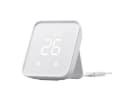
SwitchBot Hub Mini (Gateway)
Connects SwitchBot devices to the cloud. Required for API control.
SwitchBot Plug Mini (Smart Plug)
Switches the fan automatically. Compact and energy-efficient.
Outdoor Sensor: Open-Meteo (free)
Weather data is automatically fetched by location. No extra sensor needed.
Fan (for both setups)
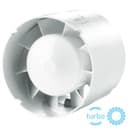
Inline Fan 100mm with EU Plug
Hon&Guan or similar. Quiet (26–45 dB), just plug in.
Inline Fan 150mm with EU Plug
For larger basements. Higher airflow (up to 350 m³/h).
10x cheaper than the competition
Traditional dew point controllers cost €900–€1,600. With Breeqo and smart home sensors, you get the same result from €65.
| Feature | Breeqo + Shelly | Traditional Systems |
|---|---|---|
| Sensors | Shelly / SwitchBot (from €25) | Proprietary sensors |
| Control | Smart Plug (from €15) | Dedicated controller |
| App & Dashboard | Web app + Push | Display on device only |
| Notifications | Email & Push | None |
| Trend Forecast | 6h forecast (Pro) | None |
| Price | From €65 one-time + app free | €900–€1,600 |
Ready? Up and running in 10 minutes.
Sign up for free, connect your sensors, and your basement will be ventilated automatically.
No subscription required · Free plan available
Frequently Asked Questions
Which fan do I need?+
For most basements, a 100mm inline fan (approx. 150–200 m³/h) is sufficient. For larger basements or multiple rooms, we recommend 150mm.
Is a tilted window enough?+
Yes, for getting started, an inline fan in a tilted basement window works very well. For a permanent solution, we recommend a window panel or wall penetration.
Can I do the wall penetration myself?+
Yes, with a rented core drill (approx. €50/day at a hardware store) it's quite doable. Alternatively, a tradesperson can do the drilling for around €100–200.
Shelly or SwitchBot – which is better?+
Both work perfectly with Breeqo. Shelly is slightly cheaper and doesn't need a gateway. SwitchBot offers a broader ecosystem with bots and cameras.
Do I need an outdoor sensor?+
No, Breeqo automatically uses Open-Meteo weather data for your location. A dedicated outdoor sensor is optional but not necessary.
How much does the app cost?+
The basic plan is permanently free (1 location, 1 room). The Pro plan (€3.99/month) offers unlimited rooms, trend forecasts, and push notifications.